
Before your first purchase: preview offers and handle owned stock
Preview containers or machines, inspect the offer and check ownership before moving stock. Previewing does not make the goods yours. This page covers pre-purchase checks and inventory controls; the final payment step has not been verified as a complete walkthrough.
Versioned sources · Reviewed 24 Oct 2026 · Source-based, not hands-on tested
Version, sources and testing limits
September–October Demo evidence; gallery build unknown; announced 1.0 kept separate. The official patch, community reports and our editorial checklists are identified separately. No current save or 1.0 build was tested. See the dated sources at the end; older UI operations and rates may change.
In this guide
Before you pay
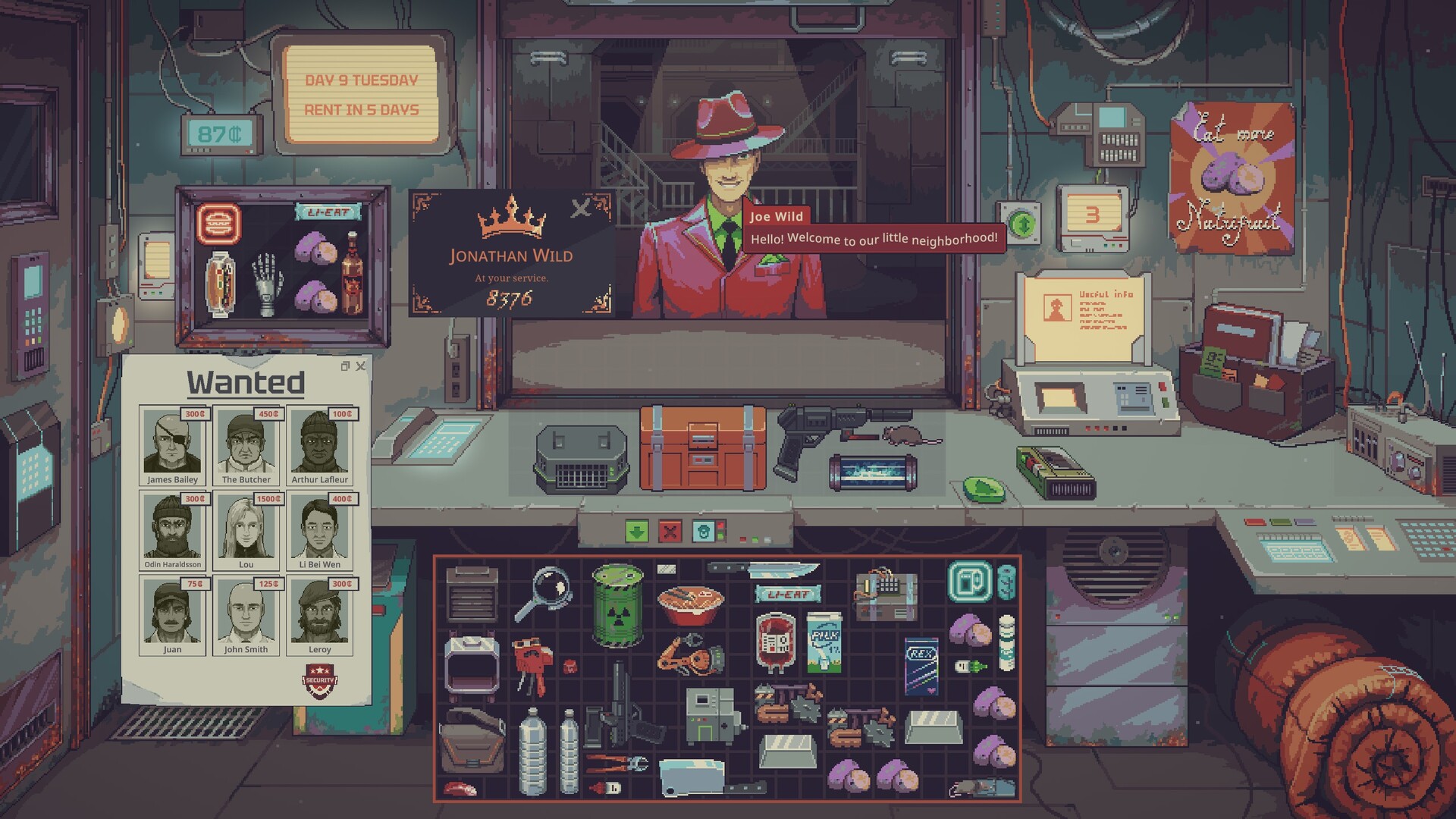
For a new release run, first choose your scenario and difficulty. The interface landmarks below come from the older official gallery; they are not screenshots of a newly tested transaction.
- Preview what is inside. Update 049 allows opening containers and machines before purchase. Check contents instead of valuing a bundle by its outer name.
- Inspect what changes its value. Read condition, tags and the relevant in-game manual. If it is an appraisal item, use the manual-first appraisal steps before inventing an offer.
- Name the likely buyer. A valuable object is not useful stock if you do not understand its acceptance conditions. If you cannot match it to a request, defer the investment or check the buyer/display guide.
- Check ownership before using or moving the goods. Previewing is not ownership. The patch prevents owned items being inserted into unowned containers and UV treatment of unowned goods. Official patch
Expected result: you can identify what is being offered, which goods and containers are yours, and which inspection or inventory action applies. This is a pre-purchase and inventory checklist, not a complete transaction walkthrough.
The unverified final step: our inspected footage includes a trade panel, but not a continuous confirmed-payment sequence with an observed cash and ownership change. A visible offer, an entered amount or goods on the counter does not prove a completed purchase. We therefore do not prescribe a guessed confirmation button/key or claim that following this page completes your first sale.
Place the stock where it has a purpose
In the image, the small upper-left case displays merchandise; the centre surface is where an offered transaction is visible; the lower grid holds inventory. Moving goods between these regions is not the same as making a sale. Compare the actual request and trade confirmation before assuming ownership or payment changed. The screenshot identifies landmarks only; it does not prove a hidden attraction formula. Official gallery
September gameplay gives a second visual reference: around 04:10, the counter contains a water jug in the display and an on-screen right-click interaction hint. We inspected that frame. It does not prove Ctrl behaviour, spawn rates or the player’s eventual profit. Public gameplay
Inventory actions and their limits
| Task | Documented action | Important limit |
|---|---|---|
| Move several items | Drag a selection box, then move the selected items | Selection does not grant ownership |
| Place across inventories precisely | Hold Shift while dragging | The patch specifies moving into a different inventory |
| Sort a grid inventory | Right-click, then choose sort in the contextual menu | Right-click opens the menu; it is not an instant-sort command |
| Rotate or flip dragged goods | Mouse wheel up/down and middle click | Applies while dragging |
| Close an item/paper window | Escape closes the most recently used GameItem or PaperUI | Not a promise that every kind of window closes identically |
| Send an item to the trash bin | Delete while hovering an owned item in the store | Destructive in-game action: check the hovered item and ownership |
| Equip a Toolbox tool | Keys 1-9 select corresponding tools | Toolbox is sold by Dr. Jackson after day 14, not assumed starting gear |
Move several items
Action: Drag a selection box, then move the selected items.
Important limit: Selection does not grant ownership.
Place across inventories precisely
Action: Hold Shift while dragging.
Important limit: The patch specifies moving into a different inventory.
Sort a grid inventory
Action: Right-click, then choose sort in the contextual menu.
Important limit: Right-click opens the menu; it is not an instant-sort command.
Rotate or flip dragged goods
Action: Mouse wheel up/down and middle click.
Important limit: Applies while dragging.
Close an item/paper window
Action: Escape closes the most recently used GameItem or PaperUI.
Important limit: Not a promise that every kind of window closes identically.
Send an item to the trash bin
Action: Delete while hovering an owned item in the store.
Important limit: Destructive in-game action: check the hovered item and ownership.
Equip a Toolbox tool
Action: Keys 1-9 select corresponding tools.
Important limit: Toolbox is sold by Dr. Jackson after day 14, not assumed starting gear.
The Toolbox stores tools, including the blue and red labelers. These are September patch controls, not keys we tested in game. The released 1.0 UI may present them differently; these controls retain their September source scope. The important ownership and Toolbox restrictions remain visible on phones. Official controls
Which tool do I need?
| Problem in front of you | Use / next procedure |
|---|---|
| Unknown item value | Current item-specific manual and inspection, then the appraisal worksheet |
| Water label or quality doubtful | Testing strip or AquaScan before selecting a treatment; water sequence |
| Stock piles up | Compare display purpose, actual buyer request and acceptance; stock diagnosis |
| Machine stops | Numeric charge, current demand and output; power diagnosis |
The linked procedures identify their own evidence and equipment limits. This index is deliberately not another duplicate tool article.
If the move or transaction is refused
- A container can be opened but refuses your item: check whether you bought it. Do not bypass the ownership rule by assuming a preview grants use.
- You can select an item but cannot treat it: check ownership first, then the tool-specific requirements. Water treatment has a separate sequence below.
- The buyer is present but rejects the goods: note the exact item tags and request; a broad category label is not universal acceptance.
- You are producing more but cash keeps shrinking: compare acquisition/processing costs, actual sales and unsold stock before buying more capacity. No fixed rent reserve or schedule is claimed here.
Sources
- Official Update 049 — September 14; readable in official news feed · retrieved 2026-10-24
- Official developer description and screenshot gallery — build unidentified · retrieved 2026-10-24
- Official Demo listing — explicit Demo Content block · retrieved 2026-10-24
- CthuLuck — September 15 Demo gameplay; inspected public player, not our playthrough · retrieved 2026-10-24